A chat list is not a cockpit
What I built around CloudCLI to run dozens of agent sessions from a phone
The agents scaled the day I started more than one. The interface did not: it still assumed I was having a conversation.
Since September I have started about six hundred agent sessions. Not runs of a script: sessions, each one a Claude Code conversation working in a repository, many of them started and steered from a phone through CloudCLI, an open-source web interface for coding agents. On a normal day I start a dozen. Some are building, some wait for a test suite, some have finished and want a decision.
None of that is limited by the agents. It is limited by me: by how fast I can find the one session that needs me, and how fast I can tell what it needs without reading forty screens of transcript. Every chat interface I have used is built for the opposite case, one person in one conversation. A list of chats is an inbox with the unread markers taken out.
So over the last seven weeks I built the cockpit CloudCLI does not have. It has three parts, and each one answers a different question.
Sort by what, not by where
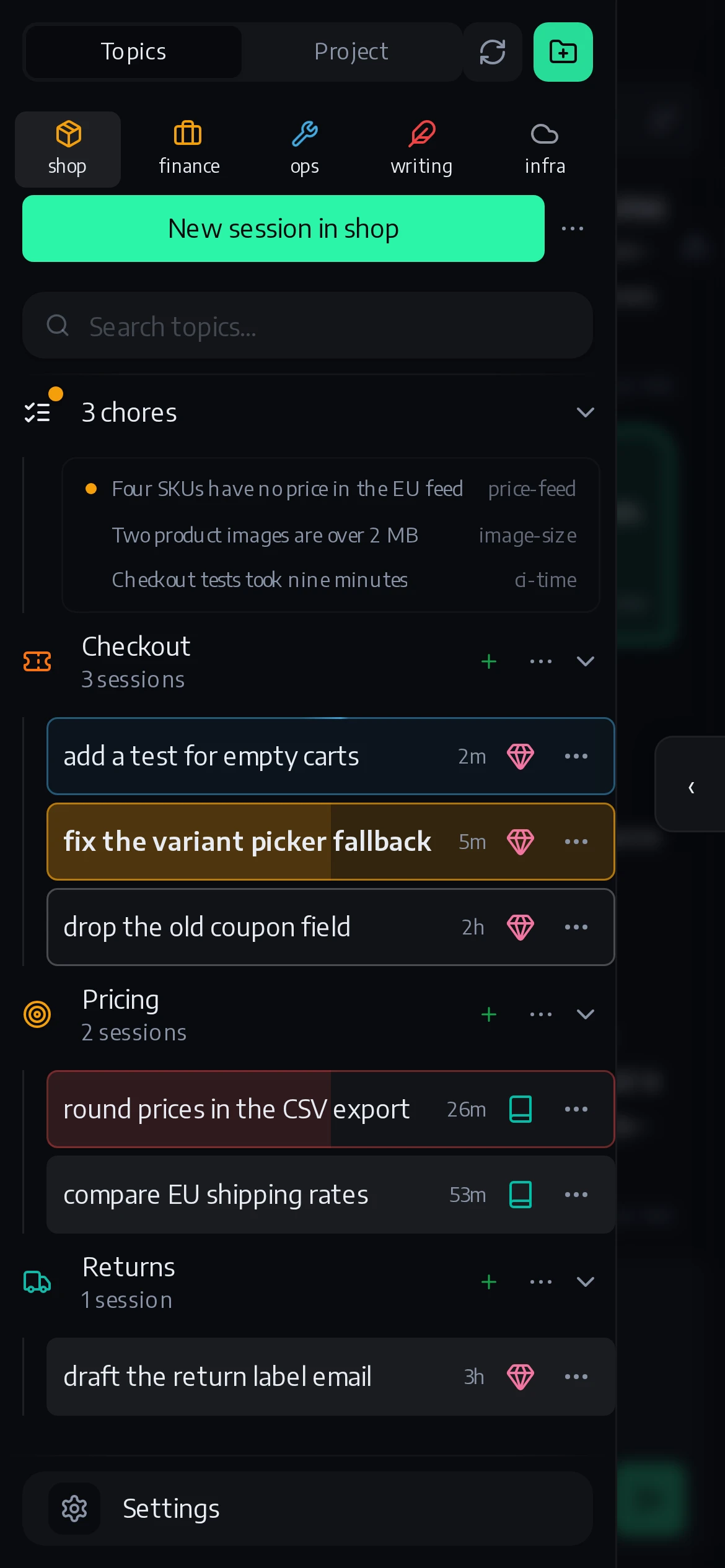
CloudCLI’s left panel lists projects, and under each project its sessions. That is the right shape for the machine and the wrong one for the work. What I am working on is a handful of topics, and one topic is usually three sessions in three repositories: the VAT return touches the bookkeeping code, the shop and the automation server at the same time.
The Topics sidebar groups sessions by a bracket in their name, [vat-return] reconcile September payouts, under tabs for each group of repositories. The
mechanics are trivial. The rules around them were not, and I got them wrong
often enough to have an opinion:
- Every session gets a topic on its first turn. “Name it once the subject is clear” reads like an obligation and behaves like a deferral: when I counted, fewer than half of all sessions had ever named themselves, and an unnamed one drifts through the list under whatever was typed into it last.
- A topic is set once, and only a person moves it. Agents that were free to relabel re-filed their own work mid-session, and the list rearranged itself under my thumb.
- Near misses are refused.
invoicenext toinvoices,deploynext todeploys: an agent proposing a plural or a two-letter typo of an existing topic gets told no and shown the list. Otherwise every topic grows a twin. - The taxonomy is not finished, and that is fine. It has been rebuilt four times: free tags, then repository groups, then topics inside groups, then groups as tabs with topics back on top, the last two on the same day. A structure you can rebuild cheaply beats one you designed well.
Amber means you
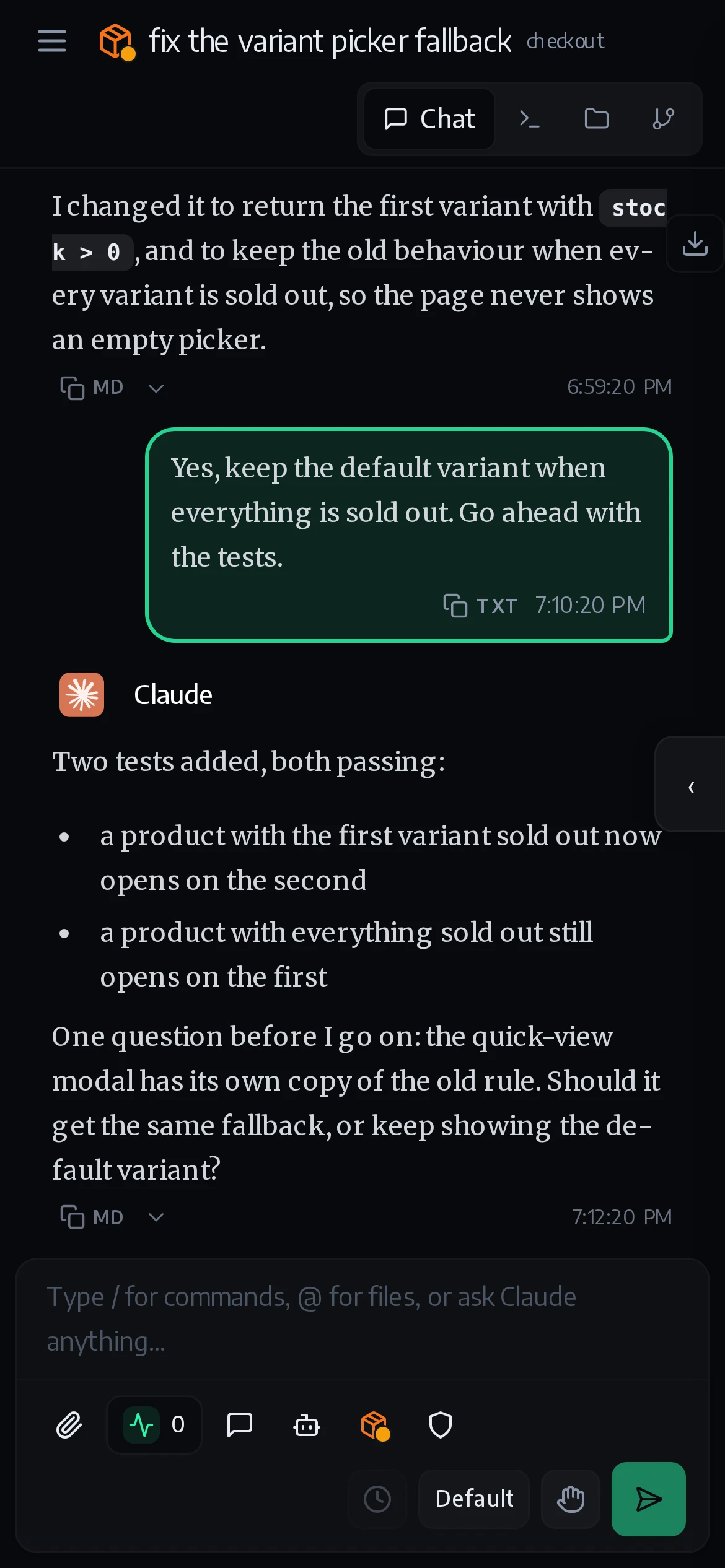
Every session row wears its state. Blue with a glint running round the edge is working, red is finished with loose ends, plain is ready, and amber means one thing only: this needs you. A question, a decision, a release waiting for a tap. A row part-way through its plan fills from the left like a progress bar, and each group tab takes the colour of its most urgent session. If amber is reliable, the whole sidebar collapses into one glance at a phone.
It started as a small dot on each row, and the dot lost. Twenty rows, each with a dot and a coloured project pill, under six tabs that each carried a dot and two counts: six tabs read as twelve colours and twelve numbers, and the one amber dot drowned among them. So the row itself became the signal, and everything else on it went quiet: the project shrank to its icon, the counts moved into a tooltip, and ready rows went back to looking like the vendor’s own.
It took two failures, in opposite directions, to get there. The first version turned amber whenever a session stopped with nothing running. Measured over 51 open sessions, 43 were amber. Amber on 43 rows says nothing, so the ordinary end of a turn became “ready”, and amber was left to the sessions that declared they were waiting.
Then I counted the other way. Over two weeks, 53 of 277 sessions had ended in a state that needed me, and 10 of them showed amber. The other 43 asked their question in prose, politely, in the last paragraph of a reply, and the row stayed calm. An agent that says “should I go ahead?” in text has asked nobody.
So I stopped relying on the agent and read the records other systems already keep: a permission prompt that is open, a release that has not been approved, a turn that ended on an API error, a background job that finished while nobody was looking. None of those is a guess, so a wrong amber now means a wrong record somewhere, which is a bug you can find.
The rule behind it is the one this whole setup keeps teaching me: a signal that is off must read as off. The worst failure is a signal that is wrong in exactly the way that looks like “nothing to do”.
Steer it without reading it
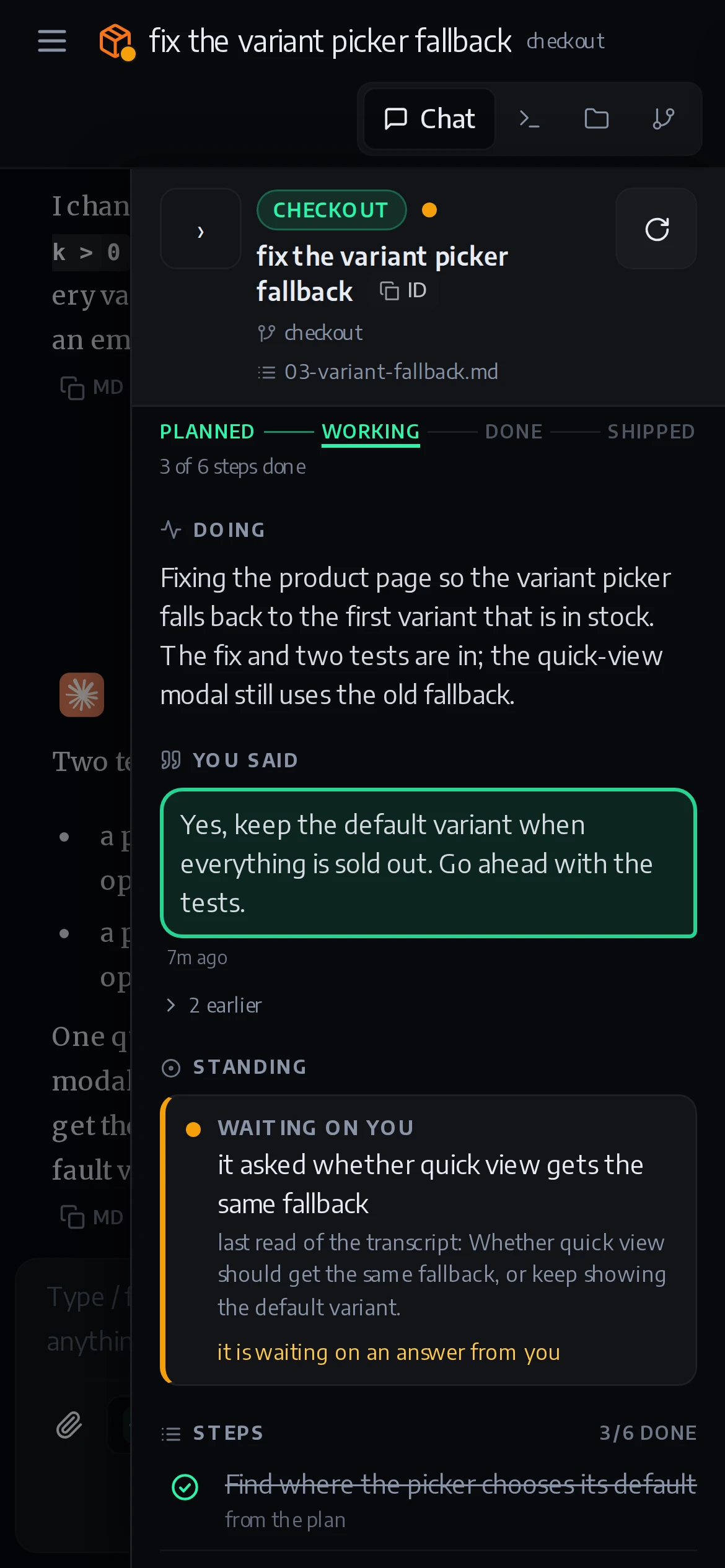
The panel on the right edge answers the second question: not which session,
but what is happening in this one. It shows the title and topic, how far
along it is from planned to shipped, two lines on what the session is doing, the last things I asked it for, where it stands and
what it is blocked on, its steps (3/6 done), the loose ends it still has open,
and the two ways to end it.
Two things about it surprised me.
I deleted the first version the day after it shipped. It was a list of every running session across all projects, which sounded useful and was the wrong question in the wrong place. That list moved to the left and became the Topics sidebar. The right edge came back three days later with the question it should have had from the start.
And it is not a judge. Every line on it is decided somewhere else: the summary
comes from the tracker that already writes one, the state from the same reader
the sidebar uses, the loose ends from the same rules the /recap command
applies. A panel that formed its own opinion would be a fourth voice, and the
moment there are four voices they start to disagree. Its buttons do not do
anything clever either. Spin off types /spinoff <title> into the session,
exactly what I would have typed.
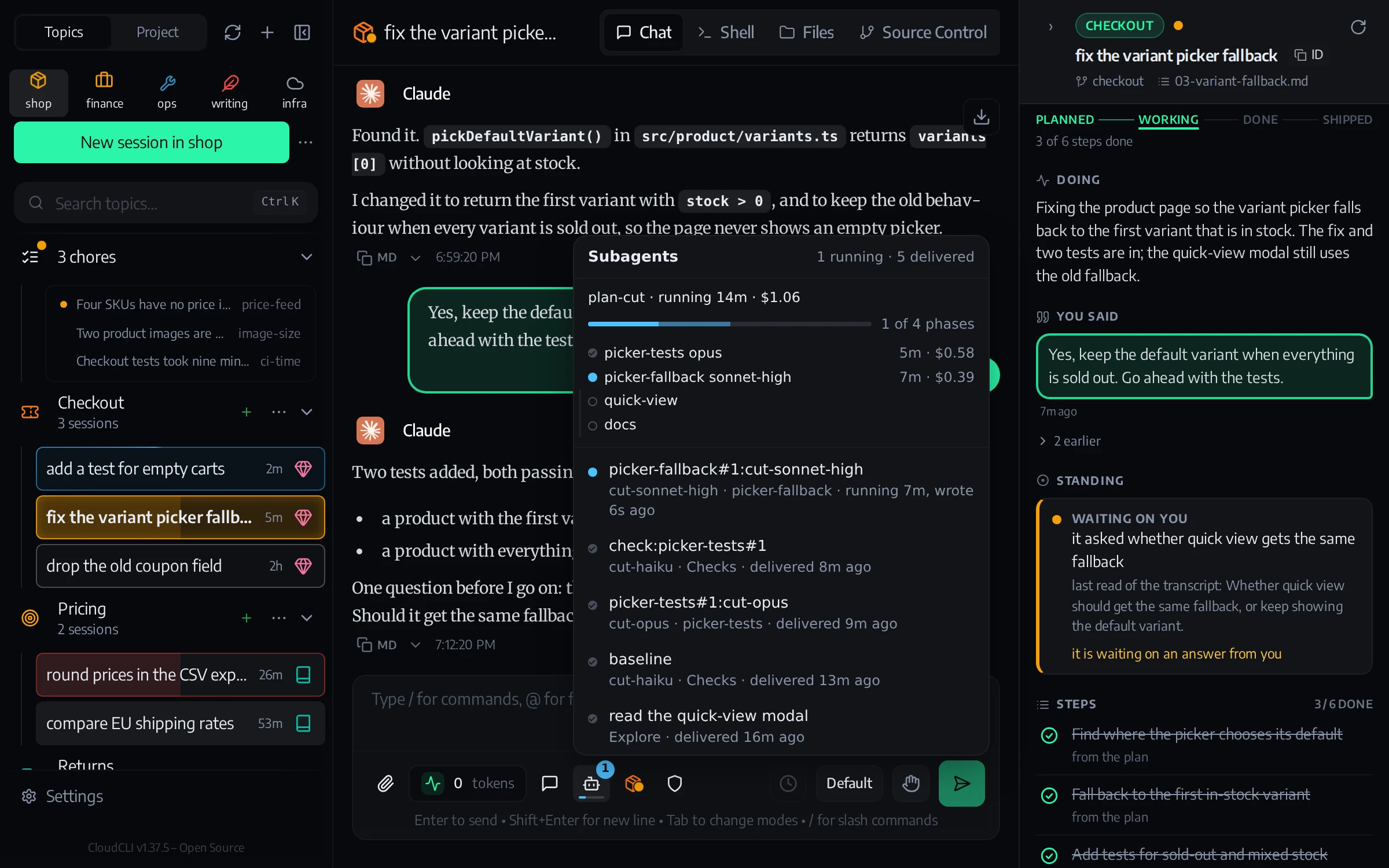
The same session on a desktop, where all of it fits at once. Rendered from the real code with invented data.
The chat goes quiet, the work does not
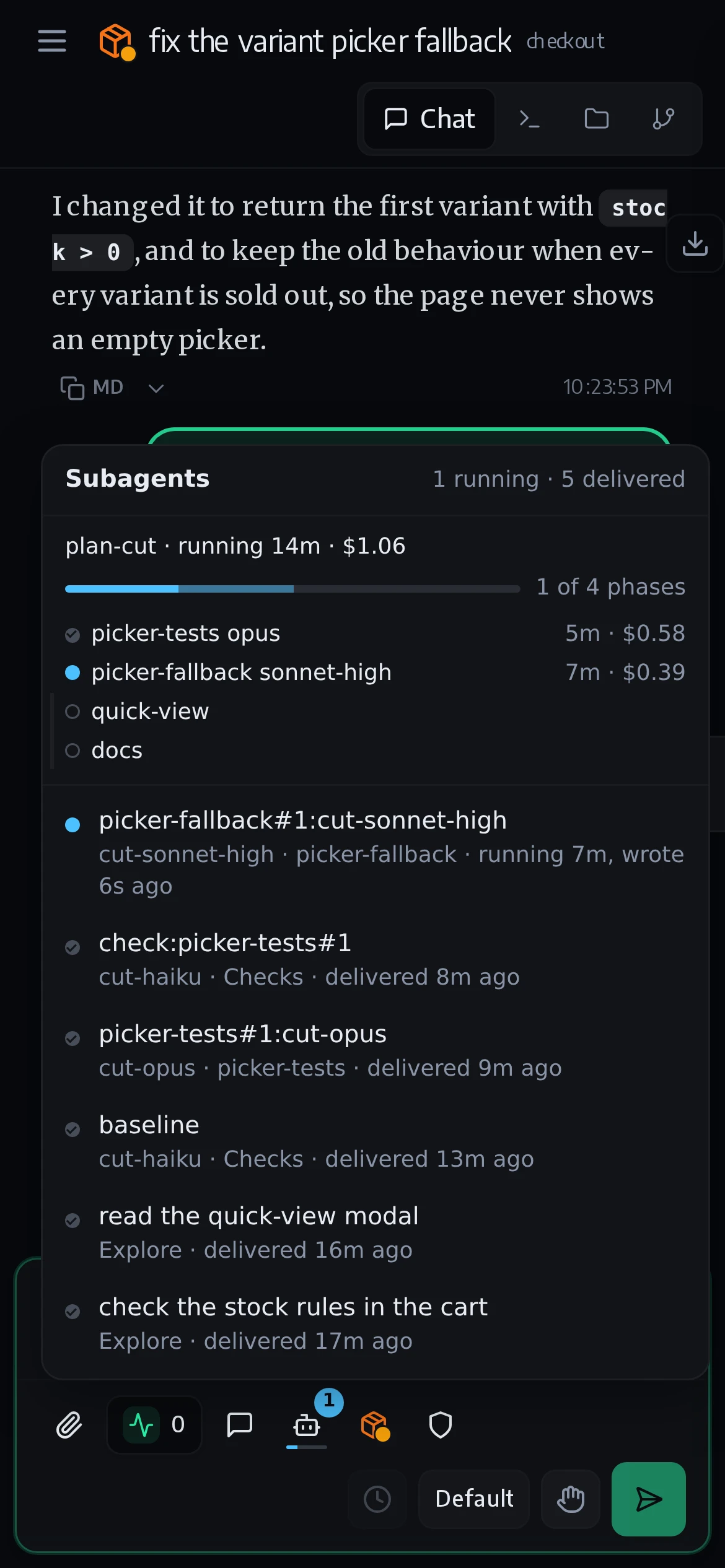
A session that hands work to background agents ends its turn while they run. The chat stops moving, the row says working, and nothing says what is working. So the composer got one more button: a bot icon with a badge that counts the agents still running and pulses while there are any. Tap it and it lists them, each with the job its parent gave it and the same dots the sidebar uses.
The bigger jobs cut a plan into phases and hand each phase to its own agent, with its own model. Those show up as a progress bar with one row per phase: done, running, queued, failed. The same bar runs thinly along the bottom of the icon, so a long run can be followed without opening anything.
The hard part was reading how an agent ended. One that reports through a structured result finishes on a tool call instead of a normal last reply. On 7 October, 347 of 1,139 agent transcripts ended that way, and without a rule for it every finished workflow read as a column of red rings: a failure signal for work that had succeeded. And when the reading itself fails, the badge turns into a grey question mark instead of disappearing, because “nothing running” and “could not ask” must not look alike.
Building in a house with one door
None of this is a CloudCLI feature. Its plugin system offers exactly one slot, a tab, and a tab is the wrong shape for all three: it is full screen, and it exists only while you look at it.
So everything is hung next to the vendor’s interface rather than patched into it. A plugin server re-injects the sidebar, the sidecar and the composer button into CloudCLI’s page at every boot, because every update overwrites the files. Nothing of their interface is rewritten; their own panels are hidden from my stylesheet. The worst this can do is fail to appear. A patch of their bundle could take the whole interface down instead. On the server side two small patches remain, and one of them is waiting upstream as a pull request of its own.
That discipline had a price I only saw once I measured it. The sidebar twitched while a reply streamed in. Counted on a test page that mimics React rebuilding the panel, it was five visible flashes a second: the code hid the vendor’s nodes one frame after the browser had already painted them. Moving the hiding into a stylesheet rule, which the browser applies before it paints, removed the cause. The sidebar alone is now 6,800 lines over a hundred commits, the sidecar another 4,500, and most of those lines are about living politely in somebody else’s house.
The other half of being a guest is giving back. Two of my fixes are in
CloudCLI itself: an archived session no longer reappears after a rescan
(#1220), and TypeScript’s
.mts files get syntax highlighting
(#1223). And with
release 1.37.5, five of my local patches retired, most of them because CloudCLI
now does the same thing itself.
And one pull request is open that would end the house-with-one-door problem for everybody: #1640 lets a plugin declare scripts and styles that load on every page, not only inside its tab. The host loads them, tracks them and removes them again when the plugin is disabled, without a reload. It grants nothing a plugin cannot already do; it replaces writes into the host’s files with assets the host owns. If it lands, the sidebar loads like any other plugin, and the boot-time injection goes away.
It would not make the sidebar shippable as it stands. It still finds the vendor’s panel by its CSS classes, and its chores, topic list and states come from tools that only exist on my machine. A smaller version that only groups sessions by topic could ship to anyone. That is the next door.
The interface is the bottleneck now
The agents got cheap and parallel faster than anyone redesigned the screen around them. Every interface I know still assumes the human is the one doing the work, one conversation at a time, and the human is now the scarce part: the one reading, deciding and approving.
What I needed was three plain answers, each available at a glance on a phone: what am I working on, what needs me, and what is this one doing. I expect every agent interface to grow those three answers within a year. Until then, I keep building them into the one I use, from the outside, one door at a time.